Savings Goals
Savings Goals help you set aside money for specific targets — an emergency fund, a holiday, a big purchase. Each contribution reduces your financial capacity, making savings intentional.
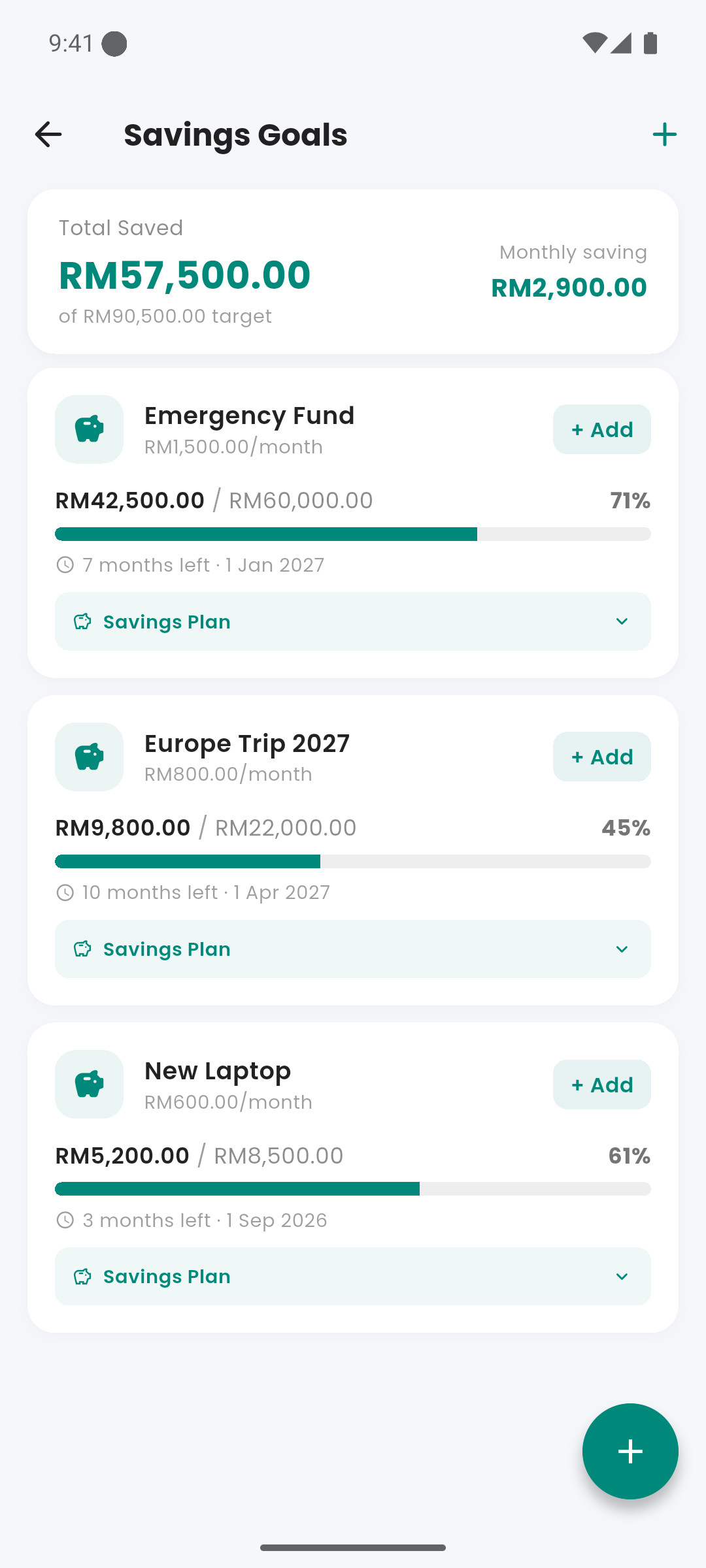
Savings Goals screen with progress cards
lightbulb How Goals Work
Each savings goal has a target amount, an optional deadline, and a balance that grows with each contribution. The total of all active goal contributions is subtracted from your financial capacity each cycle — savings come before discretionary spending.
add_circle Adding a Goal
Access from the Quick Links on the dashboard. Tap + to create a goal. Enter: goal name, target amount, optional monthly contribution amount, optional deadline. You can leave the monthly contribution blank and log contributions manually.
savings Logging a Contribution
Open a goal and tap "Log Contribution". Enter the amount and date. This creates a structured transaction linked to the goal and updates the goal balance.
credit_score Goal Cards
Each goal shows: goal name, current balance, target amount, progress percentage, and deadline (if set). A progress bar fills as you contribute.
check_circle Completing a Goal
When a goal's balance reaches the target, it's marked complete. You can archive it or keep it visible. Archived goals no longer deduct from your capacity.
schedule Deadlines
If a deadline is set, Expenses calculates the required monthly contribution to reach the target by the date. This is shown on the goal card as a suggested amount.